

Employee experience is more than just a welcome gift, a few surveys, or a nice office.
Every employee has a journey with your company, starting from the first time they hear about your brand to when they leave (and sometimes return). If HR doesn't look at this journey as a whole, you might see:
- great candidates dropping out after the first interview;
- new hires disappearing after accepting an offer;
- talented people leaving because something felt off;
- processes that look good on paper but don't work in practice.
- what an employee journey map is (and how it's different from a customer journey map);
- the main stages and touchpoints of an employee journey;
- how to create an employee journey map step-by-step;
- what a simple employee journey map template looks like;
- how to connect your EJM to a digital HR system like HarmonyHR.
- stages of the employee lifecycle (hiring, onboarding, effective work, development, exit, post-exit);
- touchpoints at each stage (emails, interviews, 1:1s, reviews, HR processes and tools);
- company goals and pain points;
- employee goals, needs and feelings;
- sometimes problems and solutions, with responsible people and deadlines.
- Stages – the main phases of the employee lifecycle.
- Touchpoints – specific interactions between the employee and the company.
- Company goals – why each touchpoint exists.
- Employee goals & emotions – what people want and how they feel.
- Problems & ideas – where people get stuck and how to improve it.
- Owners & status – who is responsible for changes and what's been done.
- Hiring – "Find a job that fits me"
- Onboarding – "Understand the company, my role and expectations"
- Effective work – "Deliver results and feel recognised"
- Growth & development – "Learn, grow and see a future here"
- Exit – "Leave the company without burning bridges"
- Post-employment – "Stay in touch as an alumni or potential re-hire"
- vacancy, careers page, employer branding content;
- sending the CV or LinkedIn profile;
- first contact with the recruiter;
- tech and culture interviews;
- offer or rejection;
- communication after the offer.
- pre-boarding emails and access;
- a plan for the first day and week;
- intro meetings with HR, manager and team;
- IT access, tools and policies;
- probation period checkpoints and feedback.
- cut duplicated interviews,
- added a clear 30–60–90 day plan,
- and introduced weekly 1:1s during probation.
- regular 1:1s with their manager;
- performance reviews and OKRs;
- daily tools like HRIS, calendar, task managers, ticket systems;
- recognition and rewards;
- support from HR.
- development plans and growth conversations;
- internal mobility, new roles and projects;
- training, mentoring and coaching;
- salary reviews and promotions.
- resignation or termination conversation;
- knowledge transfer and handover;
- access shutdown and paperwork;
- exit interview and final feedback.
- requests for documents and references;
- alumni communities and newsletters;
- invitations to events;
- boomerang hiring.
- Touchpoints – what exactly happens and through which channels.
- Company goals/problems – what you try to achieve or fix.
- Employee goals/problems – what they want and what challenges they face.
- Experience & emotions – how they actually feel.
- reading a vacancy or LinkedIn post;
- submitting an application;
- talking to a recruiter or hiring manager;
- receiving onboarding tasks;
- asking HR about benefits;
- requesting time off;
- going through performance review;
- handing in a resignation letter.
- the company wants to assess fit, reduce risks and costs, and fill roles on time;
- the employee wants clarity, respect, and to make the right choice for their career.
- confused or anxious;
- frustrated or bored;
- motivated and excited;
- proud and recognised.
- candidates disappearing after technical interviews;
- new hires leaving during probation;
- experienced staff quitting after a poorly handled conflict or review.
- the whole lifecycle;
- or a specific stage: hiring, onboarding, development, exit.
- high early attrition;
- negative reviews on job boards;
- slow ramp-up of new hires;
- lack of internal mobility.
- interviews with candidates, current employees, managers and people who left;
- short surveys and pulse checks;
- HR system data: time-to-hire, early turnover, eNPS, exit reasons;
- external reviews on sites like Glassdoor, Indeed or local platforms.
- email from recruiter;
- signing paperwork;
- first 1:1 with manager;
- performance review;
- exit interview;
- request for reference after leaving.
- company goal (why this step exists);
- employee goal and expectations;
- problems mentioned in interviews;
- general emotional tone (confusion, anxiety, boredom, motivation, pride).
- Gaps – important moments with no structured touchpoint (like no feedback after rejection).
- Duplicates – different people doing the same thing in different stages (two HR people calling about the same topic).
- Conflicts – touchpoints that send mixed signals, like a job ad promising flexibility but a manager demanding strict office hours.
- what exactly you will change;
- which stage and touchpoint it belongs to;
- who owns the change (recruiter, HRBP, team lead, finance);
- how you'll measure success (metrics and timeframe).
- Turn key touchpoints into automated workflows: onboarding checklists, offboarding tasks, reminders for 1:1s and probation reviews.
- Store policies, FAQs and guides in a central knowledge base so employees always know where to look.
- Use HR analytics to track how changes in your journey affect turnover, time-to-productivity and engagement.
- EJM Overview – high-level view of the full employee lifecycle by stage (Discover & Attract, Apply & Select, Join & Onboard, Perform & Collaborate, Grow & Develop, Leave & Stay Connected).
- EJM Touchpoints – a detailed backlog where each row is a single touchpoint with fields for goals, emotions, pain points, owners, status and KPIs.
- Job ad & careers page
- Problem: too generic, so candidates don't know the real tasks or tech stack.
- Solution: rewrite with actual responsibilities, tools, and salary range.
- Technical interview
- Problem: 3 separate interviews with different people, leading to mixed feedback.
- Solution: combine into one structured interview with a clear agenda and a single main contact.
- Offer & post-offer communication
- Problem: no contact between offer and start date, so people accept counter-offers.
- Solution: send a warm pre-boarding pack, invite to team chat, and share the first-week plan.
- Hiring → Onboarding → Effective work → Growth → Exit → Alumni
- Hiring: job ad, interview, offer / rejection
- Onboarding: first day, first week, probation review
- Effective work: 1:1s, project milestones, recognition moments
- Growth: training, internal mobility, promotion decisions
- Exit: resignation talks, exit interview, last day
- Alumni: references, invitations, boomerang hiring
- No buy-in from the business.
HR creates a nice plan, but managers see it as "HR decoration" and nothing changes.
Fix: start with a real business problem, like turnover or slow hiring, and show how EJM helps. - Trying to fix everything at once.
Mapping the whole lifecycle is already a big job. If you try to change all processes in one quarter, everyone gets overwhelmed.
Fix: start with one or two high-impact stages. - Ignoring hiring and post-employment.
Many teams focus only on life inside the company and skip the first and last stages. But people form opinions about your brand before they join and after they leave. - Drawing maps in isolation.
If only HR creates the EJM without input from managers and employees, it will be biased.
Fix: co-create and invite people from different levels. - Never updating the map.
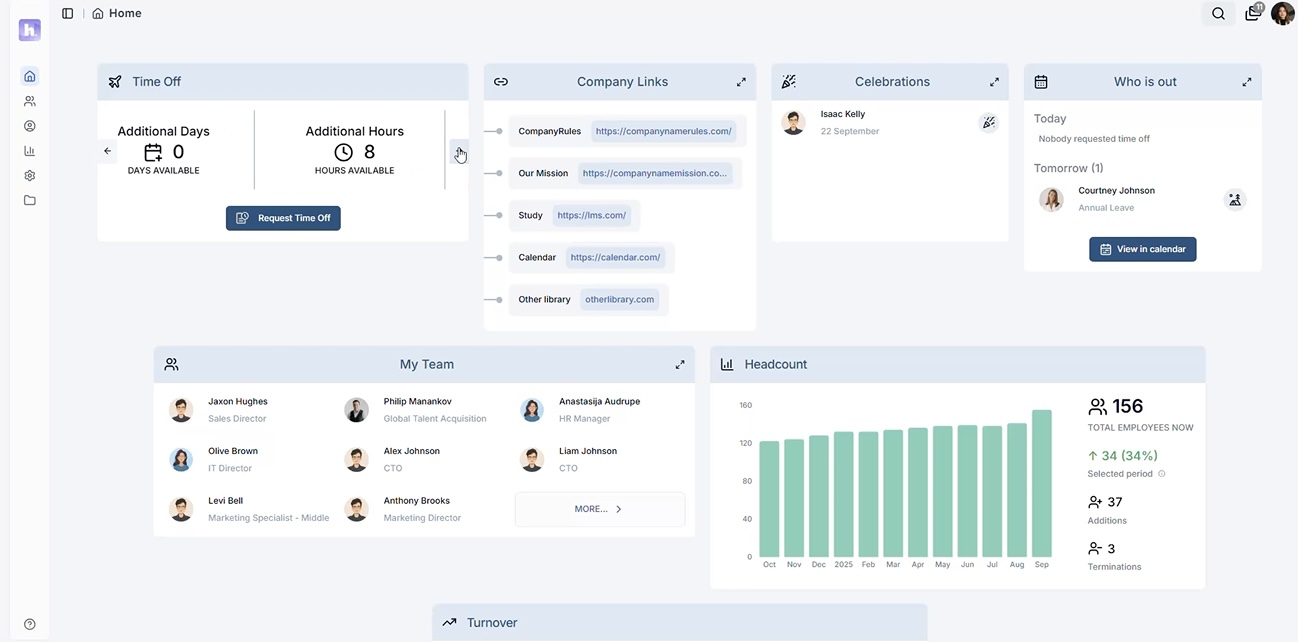
Processes, tools, and teams change. If you don't review the employee journey map at least once a year, it becomes outdated. - Onboarding, offboarding & training with automated checklists for all stages, like IT setup, access, introductions, and probation reviews. No more missed tasks or dates.
- Smart calendar & scheduling in one place to see availability, absences, and key HR events like interviews, 1:1s, and performance reviews.
- HR reports & analytics with real-time dashboards for headcount, turnover, and events help you track if your EJM changes are working.
- Notifications & alerts remind managers and HR about important touchpoints, such as probation end, anniversaries, surveys, and offboarding tasks.
- you define key touchpoints in your employee journey map;
- for each, you create a workflow in HarmonyHR (tasks, approvals, notifications);
- analytics shows how people move through the journey and where they drop out;
- HR and managers get a single source of truth instead of scattered spreadsheets.
- where candidates fall out of the funnel;
- where new hires feel lost;
- where experienced employees stop seeing a future;
- how exits affect your brand.
- Pick one high-impact stage, like hiring or onboarding.
- Map 5–10 key touchpoints, goals and problems.
- Fix 1–2 red zones and automate them in your HR system.
- Measure turnover, time-to-productivity and eNPS before and after.
Gallup's meta-analyses show that highly engaged business units achieve about 23% higher profitability, while low-engagement teams experience 18–43% higher turnover than their highly engaged peers.
An employee journey map (EJM) can help solve these issues. It shows the full path of a person in your company, highlighting all the key moments and pointing out the problems they face along the way.
In this guide, you'll learn:
👉 Prefer to see it live, not just read about it? Book a free demo of HarmonyHR and we'll map one of your roles together during the call.
What is an employee journey map?
An employee journey map (EJM) is a visual representation of the entire employee lifecycle — from first contact with your employer brand to post-employment. It shows key stages, touchpoints, goals and emotions, so HR teams can see where people struggle and how to improve their experience.
On the EJM you usually mark:
Employee journey map vs customer journey map
In marketing, customer journey maps (CJMs) track how a buyer moves from awareness to purchase and retention.
In HR, an employee journey map tracks how a candidate becomes a productive, engaged, and ideally loyal employee.
There is one key difference: in a CJM, the final point is usually a purchase or renewal. In an EJM, the formal end is termination, but you also care about alumni—reviews, referrals, and possible boomerang hires.
Key elements of an employee journey map
No matter what format you use—a table, a timeline, Miro, or Figma—a good EJM always includes:
Core stages of the employee journey
You can break down the journey in different ways, but most HR teams use six main stages:
Let's look at each one briefly.
Hiring
This is when candidates see your job opening for the first time and decide whether to trust your company.
Typical touchpoints:
Candidates are often stressed and emotional at this stage. How transparent, timely, and human you are here will determine if you get to onboarding.
Onboarding
This stage covers the time from offer acceptance to when the person starts working confidently.
Touchpoints:
The main goal is to help new hires become productive quickly and avoid the "what have I done?" feeling in the first 30 to 60 days.
If much of your process is online, such as for remote or hybrid roles, your map should show that. Onboarding, communication, and performance reviews are different when people rarely meet face to face.
Use your EJM along with this remote team management guide to create routines and tools that work across time zones.
Mini-case. A 200-person product company noticed that almost 1 in 4 new hires left within the first six months. After mapping the hiring and onboarding journey, they:
Within a year, early attrition dropped by roughly half, and managers reported that new hires reached full productivity faster.
Effective work & performance
The stage where employees do their regular work, collaborate, and see how their efforts impact the company.
Touchpoints:
Employee recognition is very important—specific, meaningful praise works better than a generic "good job." When managers know what to say and how often, both performance and retention improve.
If this stage is weak, development programs, bonuses, and benefits won't fix the relationship.
If you're still tracking most of this manually in spreadsheets and chats, take a look at the 7 signs it's time to automate your HR process.
Growth & development
Here you show if the company wants a long-term relationship.
Touchpoints:
Employees want clear, honest career paths, not vague promises. The EJM helps you spot where expectations and reality don't match.
Exit
Exit is a part of every company, no matter how strong the culture. The key is how people leave.
Touchpoints:
A respectful, structured exit phase protects your employer brand and keeps doors open.
Post-employment and alumni
Former employees can become your best advocates or your biggest critics
Touchpoints:
Mapping this stage reminds HR that the relationship doesn't end on the last working day.
How an employee journey map works in HR
An employee journey map looks at each stage through four lenses:
Touchpoints across the employee lifecycle
Touchpoints include any contact between the employee and your company. For example:
The goal of an EJM is not to add extra touchpoints, but to see what is already happening and how consistent it feels from the employee's point of view.
Company goals vs employee goals
Every touchpoint has a reason:
When you map both sides, you can see where things don't line up. For example:
you might schedule three interviews "to be thorough," but candidates may find them repetitive and feel their time isn't valued.
Emotions and drop-off points on the journey
Employees are not robots. Emotions play a big role in their decisions.
On your EJM you can mark where people feel:
Areas with negative emotions often match up with drop-off points:
These are the areas where improvements have the biggest impact.
How to create an employee journey map (step-by-step)
You don't need a perfect EJM from the start. Begin with a simple version in a spreadsheet or Miro board and improve it over time.
Step 1. Define your focus
Decide what you're mapping right now:
Connect this to a real business problem:
A clear focus keeps the map from becoming a never-ending project.
Step 2. Choose your research methods
You're mapping what really happens, not just the ideal process from your policies. So you need real data:
Interviews often give the best insights because you can ask follow-up questions and notice emotions.
Step 3. Map stages and touchpoints on your employee journey map
Create a table or board where columns are the stages of the journey and rows are touchpoints and criteria.
For each stage list all moments where the employee interacts with the company:
Be as specific as possible. "Onboarding" is not a touchpoint. "Day 1: laptop, accounts, welcome meeting at 11:00" is.
Step 4. Add goals, problems and emotions
Now enrich the map. For each touchpoint note:
This is where the map starts to tell a story.
Step 5. Spot gaps, duplicates and conflicts
Review the EJM with your HR team and managers. Look for:
Prioritise issues based on their impact on emotions and business outcomes—where do people most often drop out, leave, or complain?
Step 6. Design improvements and assign owners
For high-impact problems, define:
Now your EJM becomes a roadmap for HR changes.
Step 7. Turn your employee journey map into HR workflows
Finally, put your plan into action.
This is where HRIS like HarmonyHR becomes the digital version of your employee journey map, not just a place to store data.
If you suspect you're already drowning in Excel, check out our HR system guide — it pairs perfectly with EJM and helps you choose the right HRIS.
Employee journey map template you can reuse
If you don't want to start from a blank page, you can grab our free employee journey mapping template in Google Sheets.
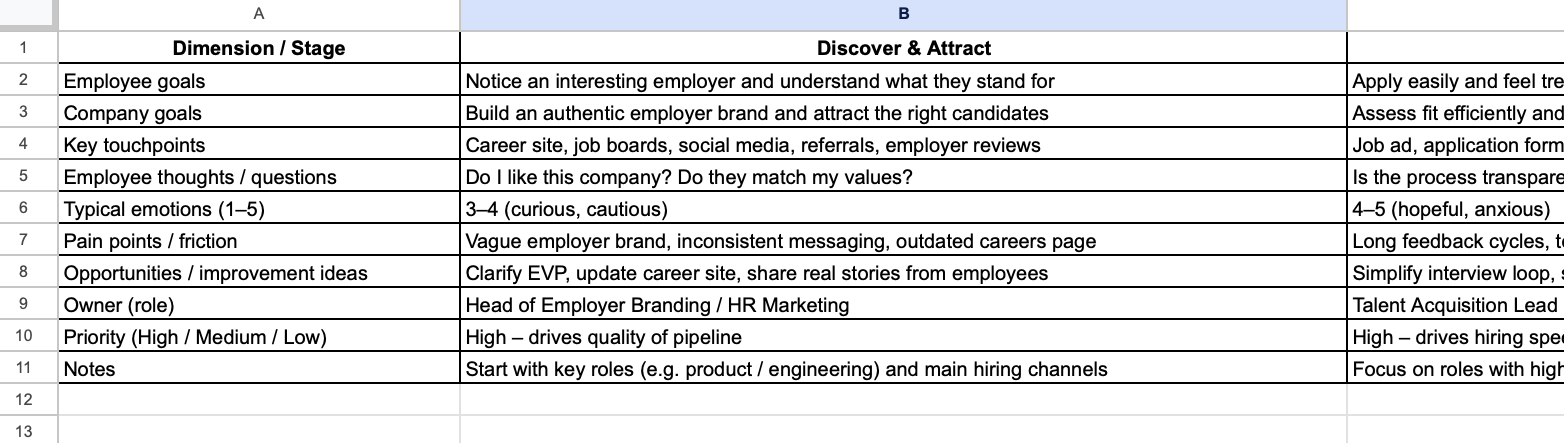
It includes two ready-to-use tabs:
Fill it in with your own data from interviews and HR reports, and you'll very quickly see where candidates drop off, new hires get stuck, or experienced employees lose motivation.
Download employee journey map template (Google Sheets)
Once your map is in place, you can mirror the same stages and touchpoints in HarmonyHR – turning a static spreadsheet into live onboarding, performance and offboarding workflows.
Employee journey map examples
Here are two quick examples.
Example 1. Hiring stage for tech roles
Stage: Hiring
Goal of employee: find a job that matches skills, salary, and work-life balance.
Touchpoints and problems:
You can put this in a table to see where to focus first.
Example 2. High-level lifecycle map
At a high level, your employee lifecycle journey map might look like a timeline:
At each stage, add 3–5 key touchpoints.
Even a simple diagram like this helps leaders see where HR needs more resources or clearer processes.
Typical mistakes with employee journey maps
When teams start using EJM, they often run into the same issues:
Digital employee journey map: how HarmonyHR fits in
A paper or Miro-based EJM is a good start. But to make a real difference, you need to use it in daily work with an HR system.
Zendesk's Employee Experience Trends report finds that 83% of organizations now see employee experience as a top priority, and 80% are already investing in HR and IT software to improve it.
HarmonyHR is designed for structured employee journeys:
In practice it can look like this:
If you're still choosing an HR system, take a look at our overview of the top HR systems ranked.
👉 Ready to see how your EJM can live inside one tool? Book a free demo of HarmonyHR and we'll map one real role end-to-end during the session.
Final thoughts
An employee journey map is not just a nice diagram for HR. It's a way to see and improve every step of how people experience your company:
Start small:
Over time, these small improvements add up, and you end up with a journey that not only looks good but also helps keep your best people longer.
Ready to map and improve your employee journey?
Book a free HarmonyHR demo, and we'll map one real employee journey together.
FAQ
What is an employee journey map in HR?

An employee journey map is a visual or table showing the whole path an employee takes with your company, from first contact with your brand to post-employment. It shows key stages, touchpoints, goals, problems, and emotions, so HR can improve hiring, onboarding, development, and exit processes.
What are the main stages of the employee journey?
Most companies use six main stages:
1. Hiring
2. Onboarding
3. Effective work and performance
4. Growth and development
5. Exit
6. Post-employment (alumni and potential re-hires)
Your employee journey map template can add or rename stages, but these six cover the full lifecycle.
How do you create an employee journey map step by step?
The basic steps are:
1. Define the focus of your EJM (whole lifecycle or one stage).
2. Collect data through interviews, surveys, HR metrics and reviews.
3. Map stages and all key touchpoints.
4. Add company goals, employee goals and emotions for each touchpoint.
5. Spot gaps, duplicates and conflicting experiences.
6. Design improvements and assign owners.
7. Turn the new journey into workflows, checklists and automations in your HR system.
How often should you update your employee journey map?
At minimum, review your employee journey map once a year or after any major change in hiring, onboarding, or performance processes. You don't have to rebuild the whole map every time. You can update only the stages where you've added new tools, policies, or workflows.
What tools can I use to build an employee journey map?
You can start with simple tools like Google Sheets or Excel to create a table-based employee journey map template. For visual maps, HR teams often use Miro, FigJam, or specialized journey-mapping tools. To make the map "live," connect it to an HR system like HarmonyHR, where touchpoints become real onboarding, performance, and offboarding workflows.
How is an employee journey map different from an org chart or HR process map?
An org chart shows reporting lines. A process map describes internal procedures from the company's perspective. An employee journey map focuses on the employee's perspective: what they see, feel, and experience at each touchpoint, and how that affects hiring, performance, and retention.
Do small companies with few employees really need an employee journey map?
Yes, but it can be very simple. Even a one-page EJM with four or five stages and key touchpoints helps a young company avoid chaos in hiring and onboarding, and build a consistent employee experience early, before problems grow with the company.