

Remote work is no longer an experiment. For many companies, building a remote team or a hybrid, remote-first team is now the default.
While remote teams offer flexibility and productivity, remote team management requires more than just moving meetings online. HR leaders and managers need to rethink how they handle communication, documentation, performance, and tools.
This guide covers:
- what a remote team is and the main types of remote teams;
- daily management tips;
- the communication and collaboration framework remote teams need;
- remote team management tips HR can standardise;
- which remote team management tools and software are worth it;
- how an HRIS like HarmonyHR fits into remote operations.
- There is a main office.
- Some people work remotely full-time or part-time.
- The risk: "second-class" remote team members may miss important context.
- Mix of office and remote, often with set in-office days.
- Processes must work for both types of team members.
- Clear rules for meetings, availability, and documentation are essential.
- No central office, everyone works remotely.
- Documentation, asynchronous communication, and strong HR processes are crucial.
- Often spread across many time zones.
- There might be offices, but remote work is the default.
- All key processes and tools are designed for remote team work first.
- In-person time is used for specific purposes like strategy sessions or team building.
- set clear goals and deliverables;
- agree on response times (for example, Slack within 2 to 4 hours, email within 24 hours);
- evaluate performance based on results, not presence.
- decisions and action items should be written down;
- key policies should be stored in a central system;
- employees should know where to find information without having to ask HR.
- live or synchronous communication (live meetings, 1:1s, instant chats)
- asynchronous communication (written updates, recorded videos, comments)
- Hold a short 15-minute stand-up for fast-moving teams.
- Async updates in a Slack/Teams channel if time zones clash.
- Team sync for 30 to 60 minutes to discuss priorities, blockers, and dependencies.
- 1:1s between managers and their direct reports.
- Department updates or all-hand meetings;
- Retrospectives or review sessions;
- Strategy and planning workshops.
- weekly written status updates;
- decision logs in project tools;
- short Loom/recorded videos instead of long meetings.
- keep a single calendar for time off, shifts, and local holidays across all time zones, so managers know who is available.
- assign recurring tasks for key communication events, like probation check-ins, performance reviews, and regular 1:1s.
- store policies and guidelines in one place so everyone knows how communication should work
- make sure contracts are signed;
- system access is set up;
- send an intro email with the schedule, expectations, and contact information.
- hold a kick-off meeting with the manager;
- introduce the new hire to the team;
- provide a clear checklist of tasks and training.
- schedule regular 1:1s;
- set up feedback loops;
- review goals and fit.
- how to request and approve time off;
- how to manage working hours and time zones;
- what "availability" means for your company.
- defining a simple performance review framework;
- providing templates for feedback and 1:1s;
- scheduling review cycles in the HRIS with automatic reminders.
- Chat (Slack/Teams)
- Video calls (Zoom, Meet)
- Task management (Jira, Asana, ClickUp)
- Documentation (Notion, Confluence, Google Docs)
- Employee database and profiles
- Time off & calendar
- Onboarding/offboarding workflows
- Benefits, assets, approvals
- Reports & analytics
- SSO, access management, audit trails.
- Global calendar & scheduling across time zones;
- Granular permissions (so managers see what they need);
- Task templates and checklists for repeatable processes (onboarding, offboarding, audits);
- Reporting on headcount, churn, time off and costs;
- Security & compliance (especially if you operate in regulated industries or multiple regions).
- Detailed permissions for any role, project or country.
- Full audit trail to make compliance easier.
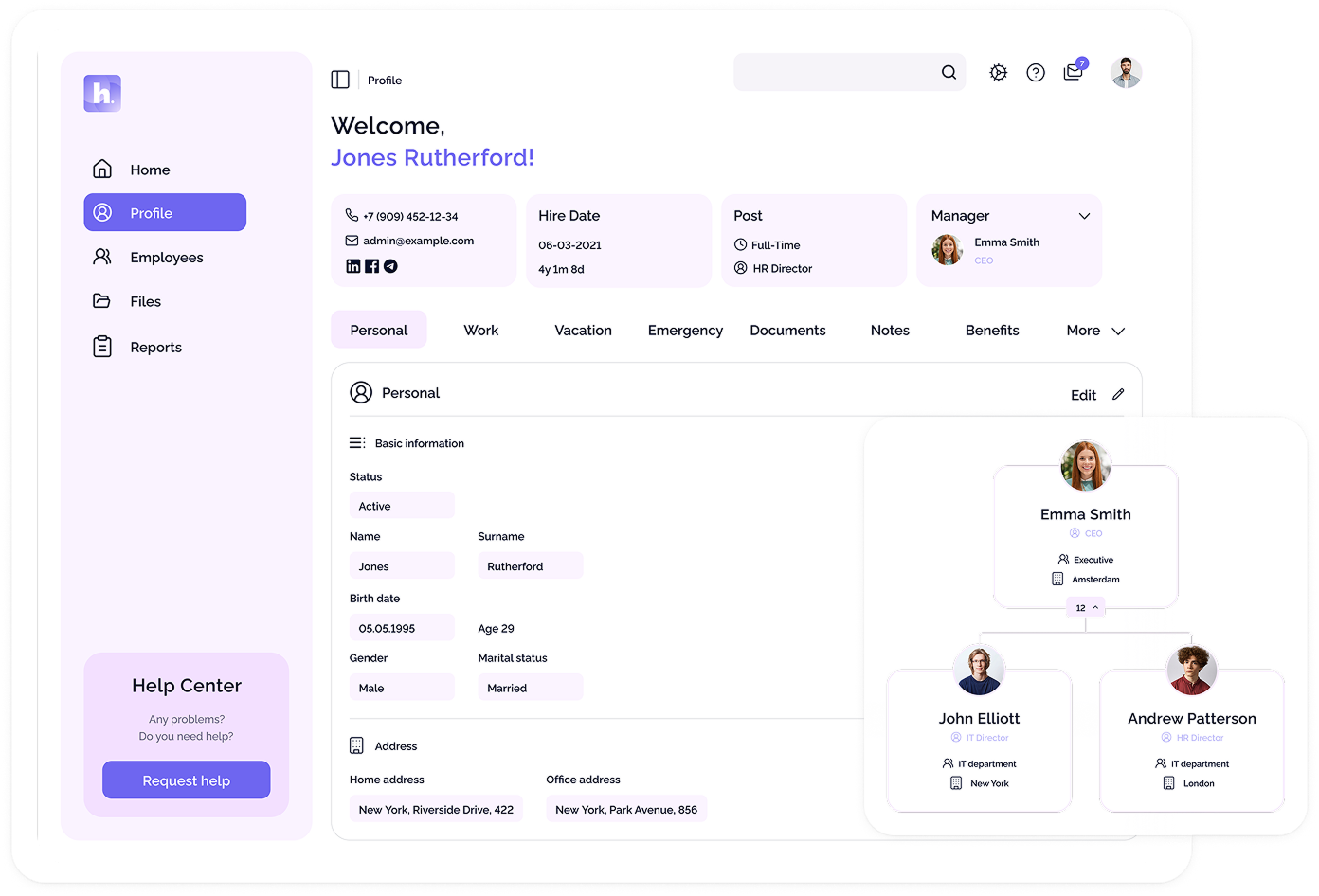
- One source of truth for your people.
- All team member profiles, documents, and data are stored in one secure, searchable hub.
- A single calendar for leave, shifts, and local holidays across all time zones.
- Clear approval flows so managers can plan with confidence.
- Templates and checklists help make onboarding and offboarding smooth and compliant.
- Assign, track, and close tasks without endless email chains
- Balances and approvals are easy to understand at a glance.
- Managers see status and history without using spreadsheets.
- Headcount, churn, time off and cost reports leaders actually read.
- Ready to use and export in one click.
- goals are written down and visible;
- ownership is clear;
- progress is reviewed regularly.
- short icebreakers at the start of meetings;
- virtual coffee chats or randomised "buddy" calls;
- themed "show and tell" sessions;
- collaborative games or challenges tied to your culture.
- Are you hybrid, fully remote, or remote-first?
- Channels, response times, meeting schedules.
- Use checklists so every remote team member has a consistent start.
- Avoid scattered spreadsheets and unofficial systems.
- Build feedback into your calendar instead of waiting for problems.
- Outcomes, timelines, quality standards.
- Not every discussion needs a meeting.
- Remote work can hide burnout, so watch for patterns in time off and availability.
- Use simple activities and shout-outs to keep people connected.
- Ask what's still manual, slow, or confusing for remote teams, and fix those first.
- Use RACI matrices for key processes.
- Assign clear ownership in your project tool.
- Keep org charts and role descriptions updated in your HRIS.
- Set up regular, short, structured meetings.
- Use async updates for status, keep meetings for decisions.
- Give managers simple agendas and templates.
- Move to a central HRIS where employees can request changes and see status.
- Automate approvals with tasks and notifications;
- Track everything in one system with an audit trail.
- Create a standard onboarding flow for remote roles.
- Pre-assign tasks to HR, IT and managers.
- Schedule checkpoints at Day 1, Week 1, Month 1 and Month 3.
- to move from reactive admin work to proactively designing remote processes;
- to give remote team managers clear frameworks;
- to use tools that keep your operations secure, compliant and efficient.
- secure access and permissions for any role, project or country;
- one source of truth for every remote team member;
- a global calendar, tasks and checklists;
- reports and analytics that show how your remote teams are really working.
What Is a Remote Team (and Types of Remote Teams)?
To improve remote team management, start by understanding what a remote team is.
What is a remote team?
A remote team is a group working toward shared goals from different locations. Team members might work from home, co-working spaces, or offices in various time zones and countries.
The key is that most collaboration happens online, not face-to-face. This affects how you communicate, document work, and build trust.
In other words, what is working in a team remotely comes down to:
Can your team get work done, make decisions and feel connected without being in the same room?
If you want the bigger picture, check out our article on the top 10 HR trends for 2026.
Types of remote teams you'll see in 2026
Remote teams come in different forms, and the types of remote teams you manage will influence your processes and tools.
Office-first with partial remote
Hybrid teams
Fully remote teams
Remote-first teams
Knowing what kind of remote team you have (or want to build) helps you choose the right management approach and tools.
Core Principles of Remote Team Management
Good remote team management is not about monitoring online status. It is about creating an environment where people can be productive and trusted from anywhere.
High-performing remote teams follow three principles:
1. Focus on outcomes, not online status
In a distributed setup, you cannot see who is at their desk, which is actually positive.
Instead of tracking hours or green dots, effective remote team managers:
2. Documentation as a superpower
In remote teams, documentation takes the place of informal conversations. If information is held by only one person or in an unrecorded meeting, it is lost to the team.
That means:
HR can lead by creating and maintaining a single source of truth for people processes.
3. Balancing synchronous and asynchronous communication
Remote teams need both:
Good remote team management does not remove meetings but makes each one purposeful and shifts other updates to async channels.
A Remote Team Communication Framework That Actually Works
One of the most common questions HR gets is:
"How often should you meet with your remote team?"
There is no single answer, but most teams benefit from a regular communication rhythm like this:
Daily, weekly and monthly rituals for remote team communication
For most remote teams, a healthy communication cadence looks like this:
Daily (optional)
Weekly
Monthly / Quarterly
How often should remote teams meet in person?
You might also wonder:
"How often should remote teams meet in person?"
While it's not necessary to bring everyone together every month, fully remote teams benefit from meeting in person at least once or twice a year. This could be through annual or bi-annual offsites, regional meetups, or in-person kickoffs for major projects.
Make sure these gatherings are focused on valuable collaboration, not just more meetings in a different setting.
Async updates: written communication that saves meetings
Async updates are essential for remote team communication. Use:
HR can help by providing managers with templates and recommending tools, so remote team collaboration doesn't rely on everyone being online at the same time.
How HR systems like HarmonyHR support remote communication
Standardize communication rituals by using your HRIS as an operational hub.
With HarmonyHR, you can:
Instead of chasing managers and employees for updates, build communication into your HR workflows.
Building Remote Team Processes With HR
Many important aspects of remote teamwork occur in routine HR processes such as onboarding, offboarding, approvals, time off, and documentation.
1. Onboarding a remote team member the right way
Onboarding a remote team member involves more than just sending a laptop.
A good process includes several steps:
Before day 1
Week 1
First 90 days
HR should manage the onboarding checklist to ensure every remote team member has a consistent experience.
With HarmonyHR, you can create a reusable onboarding template that assigns tasks, documents, approvals, and reminders automatically to HR, IT, and managers.
2. Time off, working hours and availability
Without clear guidelines, remote team work can quickly feel like being "always on." HR and managers should define:
Using a single time off calendar across locations helps prevent burnout and scheduling issues.
HarmonyHR's global calendar shows leave, shifts, and local holidays in one place, so managers can plan effectively and team members have a clear view of everyone's availability.
3. Performance reviews and feedback in remote teams
Performance issues can be harder to spot in remote teams because there's less informal feedback. That's why structured reviews and regular check-ins are so important.
HR can support remote team managers by:
If you're still choosing your core HR platform, our guide on what an HR system is and how to implement it can help you avoid the most common rollout mistakes.
Remote Team Management Tools and Software Stack
You don't need a lot of tools to manage a remote team, but you do need the right ones.
Essential tool categories for remote team management
A good remote team management setup usually includes:
1. Communication tools
2. Collaboration and project tools
3. HRIS / Remote HR tools
4. Security & access
Your HRIS or remote HR tool should serve as the main source of truth for employee data and profiles. Connect your HRIS with your collaboration tools to avoid duplicating data in spreadsheets or side systems.
What to look for in remote team management software
When choosing remote team management tools or remote team management software, focus on:
For a deeper dive into HRIS capabilities, see our breakdown of 21 must-have HRIS features and benefits.
How HarmonyHR supports remote HR and people operations
HarmonyHR is built as a complete HR toolkit for today's remote and hybrid teams.
Here's how it helps HR run remote operations:
Security & access
HR administration
Calendar
Tasks
Benefits
Reports & analytics
Want to see how this works in practice?
See HarmonyHR in action
Performance, Engagement and Team Building in Remote Teams
Remote team performance is about more than just hitting KPIs. Engagement, relationships, and trust matter just as much, especially when you don't share an office.
1. Setting clear goals and KPIs for remote teams
Remote teams work best when:
This is where HR can support managers with templates for goal-setting and review cycles, and an HRIS can keep all performance data in one place.
If you're not sure which numbers to monitor, start with these 8 key HR metrics every manager should track.
2. Feedback and recognition in a remote environment
In a shared office, recognition happens naturally, but in remote teams, silence can feel like "nobody cares."
Remote managers should build recognition into their routines, like adding a "kudos" section to weekly meetings, using async channels for shout-outs, and tying recognition to company values and specific examples.
3. Remote team building activities that actually work
Remote team building doesn't have to mean awkward Zoom games. Try:
Over time, you can build your own library of remote team building activities, games and bonding rituals that fit your culture instead of copying generic ideas from the internet.
Remote Team Management Tips: Checklist for Managers and HR
Here's a quick checklist of remote team management tips HR can share with managers:
1. Define what "remote team" means in your company
2. Write down your communication rules
3. Standardise remote onboarding
4. Use one HRIS as your source of truth
5. Schedule regular 1:1s and team rituals
6. Make performance expectations clear
7. Encourage written and async communication
8. Monitor workload and time off
9. Invest in remote team building and recognition
10. Audit your processes once a year
You can store this checklist and your own templates in HarmonyHR as tasks and onboarding flows, so every remote manager follows the same process.
If several of these remote team management issues feel familiar, it might be one of the small signals that it's time to automate your HR processes.
Common Remote Team Problems and How to Fix Them
Even well-run remote teams face similar challenges. Here are some common issues and how to address them:
"We don't know who is doing what"
Problem:
Work is getting done, but responsibilities are unclear. People overlap or tasks get missed.
Fix:
2. "We never talk unless there's a crisis"
Problem:
Communication is only reactive. Teams meet only when something goes wrong.
Fix:
3. "HR Is always late with documents"
Problem:
Contracts, approvals, and time off requests get stuck in inboxes and DMs.
Fix:
4. "New remote team members feel lost"
Problem:
Onboarding is ad-hoc. Every manager does it differently.
Fix:
Final Thoughts: Remote Team Management With HarmonyHR
Remote work is here to stay, and remote teams will keep growing. This means better remote team management is more important than ever.
For HR, this is a chance:
HarmonyHR provides the essentials you need every day:
If your HR team is spending more time solving remote issues than improving them, it's time to fix the basics.
Book a free, 30-minute assessment and we'll create a personalized remote team management plan for your company, using your headcount, locations, and current challenges as the starting point.
FAQ
What is remote team management?

Remote team management is the set of processes, tools and habits that allow managers and HR to lead teams working from different locations and time zones. It covers communication, performance, onboarding, time off, compliance and collaboration.
How often should you meet with your remote team?
Most remote teams work well with a weekly team sync, regular 1:1s and monthly or quarterly retrospectives. Fully remote teams also benefit from in-person meetups once or twice a year.
What tools do you need to manage a remote team?
At minimum: a chat and video tool, a project or task management tool, and an HRIS. Your HR system should act as the source of truth for people data, time off, onboarding and approvals.
How can an HRIS like HarmonyHR help with remote team management?
HarmonyHR centralises employee data, automates onboarding and offboarding tasks, manages time off across time zones and gives HR a clear audit trail and analytics for remote teams.