

Most “employee portals” still fail for one simple reason: they don’t solve a daily job-to-be-done for employees or managers. They become a place where HR uploads documents… and nobody returns. In practice, the best HR self-service portal (also called employee self service (ESS)) is the one people use for real approvals and tasks—not just reading policies.
This guide is for HR Ops, People Ops, and founders at companies with 50 to 500 employees who want an HR portal that people actually use every week, not just a folder for HR documents.
If your portal is in Notion, Google Drive, Confluence, or Slack threads, and employees still message HR for time off, policies, or onboarding, this guide will help you rebuild adoption by focusing on workflows instead of adding more content.
Key takeaways (1-minute read)
- Adoption depends on improving workflows, not just the interface. If the portal doesn’t make things easier, employees won’t use it.
- The best portals focus on 5 to 7 regular actions, like time off, documents, onboarding tasks, profile updates, and requests.
- To be trusted, a portal needs RBAC permissions, audit logs, and SSO or MFA.
- Successful rollouts use a 30, 60, and 90-day plan instead of a single big launch.
- You can use the HR portal requirements checklist in this article to help evaluate vendors.
- updating personal data
- requesting time off
- viewing policies
- completing onboarding steps
- accessing documents
- tracking approvals
- an intranet (which is for announcements and internal communication)
- a knowledge base (which is just documentation)
- an HRIS (which stores HR data)
- request flows
- approval status
- team calendar visibility (where appropriate)
- local holidays (especially for global teams)
- new hire checklist (docs, policies, introductions)
- manager checklist
- IT checklist (hardware/access)
- reminders and deadlines
- searchable policies
- clear categories (benefits, time off, security, expenses)
- “latest version” clarity
- access restrictions for sensitive docs
- payroll question → finance/HR
- certificate request → HR admin
- benefit issue → HR ops
- “Your probation review is due”
- “Policy updated — acknowledgement required”
- “Document missing”
- “Approval waiting”
- Less admin work for HR: fewer repetitive questions, fewer manual updates
- Faster employee experience: people complete tasks without waiting for HR
- More consistent processes: onboarding/offboarding, approvals, acknowledgements
- Better accountability: tasks have owners, deadlines, and status visibility
- Stronger security posture: access control + audit trails beat spreadsheet chaos
- The portal stores HR docs; it’s not a work tool
If it only has policies and PDFs, employees won’t come back. - Too many features and a confusing homepage
Employees need five to seven clear actions, not a long list of menu items. - Messy permissions (people see too much or too little)
If employees don’t feel their information is confidential, they’ll avoid the system. - No one is responsible for keeping the portal up to date
Without ownership, content becomes outdated in just a couple of months. - What do I need to do today?
- What’s waiting for approval?
- Where can I find the most requested HR resources?
- My profile
- Time off (request and balance)
- My tasks (onboarding/offboarding/policy acknowledgements)
- Documents and policies
- Ask HR or requests
- Team calendar
- Use short labels like “Time off,” “Documents,” and “Requests”
- Make sure users can get where they need to go in one click and that the portal works well on mobile devices
- Include a search function for policies and documents
- “Last updated” dates on policies
- List policy owners (for example, “Policy owner: HR Ops”)
- Acknowledgement tracking where needed
- SSO and MFA for authentication
- Role-based access control (RBAC) so managers only see what they should
- Audit logs for sensitive actions like viewing, editing, exporting, or approving
- Export controls (who can export what, and logging of exports)
- Clear separation of access for HR, managers, and IT
- GDPR Article 32 (Security of processing)
- NIST guidance (access control / identity basics)
- OWASP Top 10 (common web app risks relevant to portals)
- employees can update their profile data with approval flows
- time off requests, approvals and visibility
- onboarding tasks for HR/manager/IT/new hire
- documents/policies searchable with clear versioning
- request/help path through “Ask HR”
- a simple homepage with five to seven main actions
- mobile-friendly design,
- reminders and notifications
- clear ownership of portal content
- SSO and MFA
- role-based access for HR, managers, IT, and finance
- audit logs for sensitive actions
- export controls with logging
- data retention or deletion workflows if needed
- time off
- profile updates
- onboarding tasks
- documents (top 20)
- Ask HR
- approvals and reminders
- policy acknowledgements
- manager dashboard basics (team calendar/tasks)
- monthly portal review (what’s used / ignored)
- cleanup of outdated docs
- quarterly permissions audit
- Monthly Active Users (MAU): % of employees who log in and complete at least one action per month
- Time-off via portal vs email: % of requests submitted through the portal (not chat/email)
- Onboarding completion rate: % of new hires completing onboarding tasks on time
- HR ticket deflection: reduction in repetitive HR questions (policies, time off, docs) after launch
- Policy acknowledgement rate: % completed within deadline (when required)
- Approval cycle time: average time to approve time off / profile changes
- Data accuracy: reduction in “wrong address/bank details” incidents after self-service + approvals
- Permissions hygiene: quarterly review completion for RBAC roles and access (yes/no + exceptions)
- Employee self-service that uses real HR data, not copied spreadsheets
- Role-based access, so managers can do their jobs without seeing private information
- Audit logs track sensitive HR actions, which helps with security reviews
- Onboarding workflows help new hires build good habits from the start
- Deployment options, including on-premise or private cloud options for teams that put security first
- From Manual HR to HRIS: Why smart companies choose HarmonyHR
- HR System Guide 2026: Definition, Features, Pricing + Checklist
What is an HR portal?
An HR portal (often called an HR self-service portal or employee self service (ESS) portal) is a tool where employees can handle HR tasks themselves, such as:
It’s not the same as
A modern HR portal is usually the self-service part of your HRIS, connected to real HR data and workflows.
HRIS definition: What is an HRIS? 21 must-have features & benefits (2026 guide)
HR portal vs HRIS vs intranet (quick comparison)
| Tool | What it’s for | What employees do there | When it fails |
|---|---|---|---|
| HR portal (employee self-service / ESS) | Getting HR tasks done | Request time off, complete onboarding tasks, update profile, access documents, track approvals | Becomes a PDF folder with no workflows or approvals |
| HRIS | System of record for HR data | Usually not used directly by most employees (they use the portal layer) | Data lives in the HRIS but employees still email HR for everything |
| Intranet | Internal comms & company info | Read announcements, find links, browse org updates | Looks active but doesn’t reduce HR admin workload |
| Knowledge base (Wiki) | Documentation | Search policies/how-tos | Content gets outdated fast without ownership |
| Slack/Teams threads | Fast communication | Ask questions ad-hoc | No audit trail, no consistency, and answers disappear in chat history |
What should be in an HR portal? The 7 features that drive adoption
If you want employees to actually use the portal, focus on features that solve repeat problems.
1) Employee profile (self-service updates)
Let employees update their own information, like address, emergency contacts, and bank details, while HR reviews changes.
Adoption tip: If employees can’t update anything, the portal just becomes HR’s storage, not a useful tool.
2) Time off + visibility
Time off is a key feature because everyone needs it.
Include:
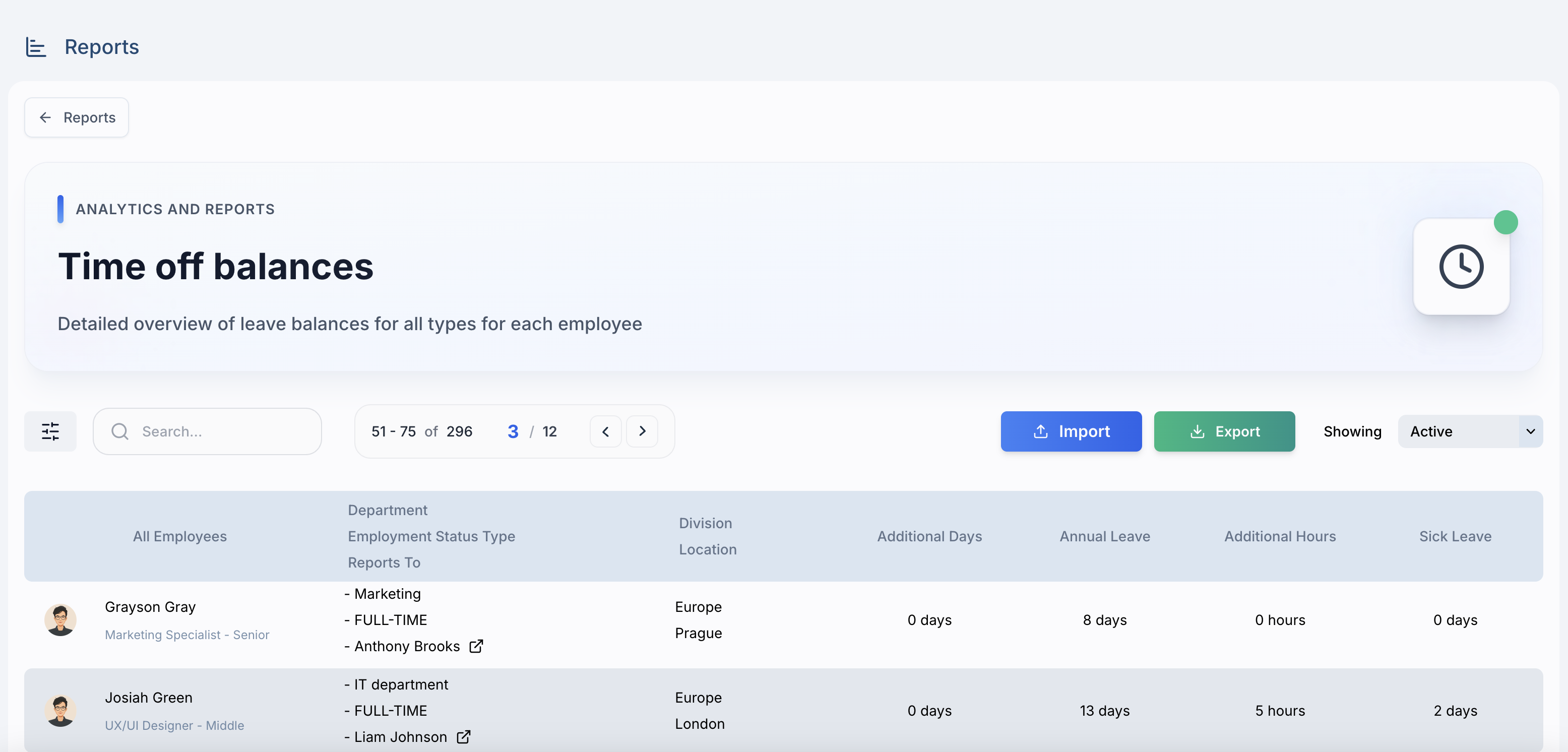
Centralized time off tracking in HarmonyHR
3) Onboarding tasks
Making the portal part of onboarding helps create a habit from the start.
Include:
Want onboarding to drive HR portal adoption from day one?
See how HarmonyHR structures employee onboarding workflows.
View HarmonyHR onboarding
4) Documents + policies (with search and version control)
Employees want quick answers, not just a folder of PDFs.
The portal should have:
5) Requests / help desk path (one obvious way to ask)
Employees need one clear way to ask for help, with requests routed to the right team:
6) Org structure and directory
A simple org chart and directory help reduce confusion, especially for remote teams.
Related reading: Remote Team Management in 2026: Tools, Tips & Templates
7) Notifications
Portals win when they create gentle, useful prompts:
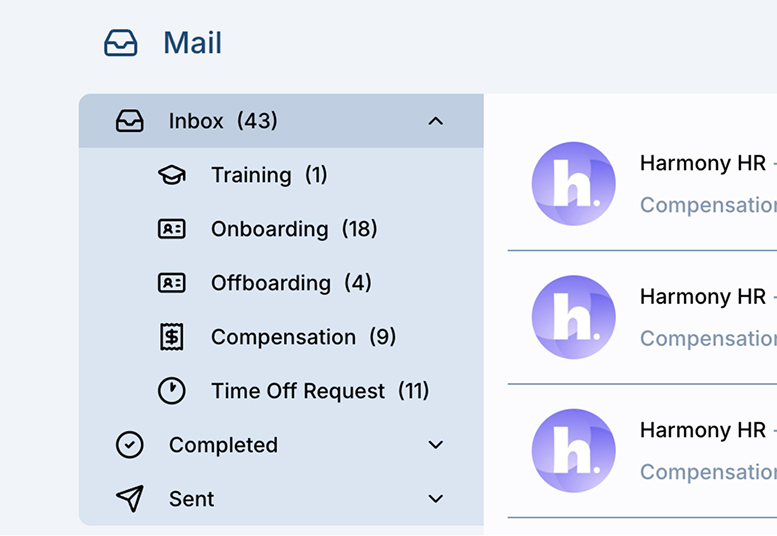
Notifications about approvals, tasks, and changes in HarmonyHR
What are the benefits of an HR portal?
HR portal adoption: why most portals fail
Here are the main reasons HR portals often fail, so you can avoid them.
Most of the time, if your portal isn’t being used, it’s a workflow problem, not a design problem.
HR portal best practices: structure that keeps people coming back
Design the homepage around the “weekly loop”
The homepage should help users answer questions like:
A straightforward homepage layout includes:
Keep navigation simple and clear
Show that the portal is trustworthy
Employees are more likely to use the portal if they trust it.
Add clear signals like:
HR portal security: what “secure HR” means in practice
If you’re working in Cyprus, Portugal, Spain, or Serbia, you’ll need to meet GDPR requirements and pass strict internal security reviews.
A secure HR portal should include:
If you work with security-conscious teams, these features are essential.
High-authority references (security & compliance):
On-premise HRIS security: On-Premise HRIS in 2026: When on-prem beats the cloud
HR portal requirements checklist
When comparing employee portal software, use this checklist:
Employee self-service
Adoption & UX
Security & compliance
When to automate HR: 7 small signs it’s time to automate your HR processes
Rollout plan: how to launch without adoption dying in week 3
Days 0–30: build the “weekly loop”
Launch only the features that help users build habits, like:
Days 31–60: expand workflows
Days 61–90: governance + optimization
HR system checklist: HR System Guide 2026: Definition, Features, Pricing + Checklist
HR portal KPIs and adoption benchmarks (what “good” looks like)
You don’t need perfect analytics to manage adoption—just a few consistent signals.
Core adoption KPIs
Process quality KPIs (to prevent “fake adoption”)
A simple benchmark mindset:
If employees still message HR for time off, onboarding tasks, and basic
policies after 30–60 days, adoption isn’t a communication problem—it’s a workflow problem.
How HarmonyHR structures an HR portal people actually use
If you want your portal to be more than just a place to store documents, it should be built into your HRIS. This keeps tasks, approvals, and employee data connected and up to date.
HarmonyHR offers:
Want an HR portal adoption plan tailored to your company?
Book a free 20-minute session with HarmonyHR — we’ll map your portal requirements, permissions (RBAC), and a simple 30-60-90 rollout so adoption doesn’t die in week 3.
Related reading:
FAQ
What is an HR portal?

It’s a self-service hub where employees and managers handle HR tasks like time off, profile updates, onboarding, documents, and requests—without using email or spreadsheets.
What should be included in an employee portal?
Start with features people use every week: time off, onboarding tasks, profile updates, documents and policies, and a clear way to contact HR. Once those are working, add a directory, org chart, and reminders.
How do you get employees to use an HR portal?
Focus on solving daily problems, like time off requests, onboarding checklists, approvals, and making it easy to find information. Roll out the portal over 30, 60, and 90 days, and track how many people use it and whether HR tickets go down.
Are HR portals secure?
They can be, if they support SSO, MFA, role-based access, and audit logs. Security also depends on good governance: controlling who can export data, who approves changes, and how access is reviewed.
What is an employee self-service portal?
It’s the part of your HR system where employees can handle routine HR tasks themselves, like updating personal details, requesting time off, finding policies, accessing documents, and completing onboarding tasks, all without emailing HR.
How is an HR portal different from an intranet?
An intranet is mostly for sharing news, announcements, and links. An HR portal is for getting things done, like requesting time off, getting approvals, checking onboarding lists, accessing documents, and updating profiles. If your portal doesn’t connect to HR data and approvals, it’s more like an intranet or knowledge base than a real HR portal.
What are the benefits of an HR portal?
The main benefits are less admin work for HR, since there are fewer repetitive questions and manual updates; a faster experience for employees, who get answers and complete tasks without waiting for HR; more consistent processes for things like onboarding, offboarding, and approvals; and better visibility and accountability for tasks, deadlines, and audit trails.