Harmony HR
01 1. Sourcing as a System02 2. The Client Brief Before Search03 3. Candidate Portrait04 4. Market Map05 5. Boolean, X-Ray06 6. LinkedIn07 7. Beyond LinkedIn08 8. GitHub and Technical Traces09 9. First Contact10 10. Candidate Evaluation11 11. Working with Clients12 12. Metrics13 13. Tools and AI14 14. Operational Model15 15. Practical Exercises
A Materials NavigatorB Mini GlossaryC RegulationsD Template LibraryE End-to-End CasesF Data, AI, PrivacyG AI Prompt Library
Home/Chapter 05

Chapter 05. Boolean, X-Ray, and Query Iteration

pp. 27–31
Search queries
Search queriesThe main structure behind Boolean and X-Ray query building.
Query iteration
Query iterationA repeatable loop for refining search queries based on result quality.

How to Use This Chapter

Read this chapter as an iteration guide, not as an attempt to build one perfect query. A good

Boolean query emerges after several small tests and a change log.

Remember in One Phrase

A query is not good because it looks clever — it is good when testing it reveals more relevant

profiles and less manageable noise.

If Your Task IsGo to SectionWhat You Get
Understand the basic mechanicsBasic Boolean logicSimple AND/OR/NOT rules
Build the first queryBoolean query worksheetA query structure from job titles, skills, and domain
Search via a search engineX-Ray search principleAn alternative way to find profiles
Improve queriesQuery testing logData for the next iteration

Quick Chapter Map

1. First, build the layers: job titles, work, tools, domain, exclusions.

2. Then create a broad, balanced, and narrow query.

3. Test the first 20 results.

4. Record relevance, noise, and the next change.

Minimal Start

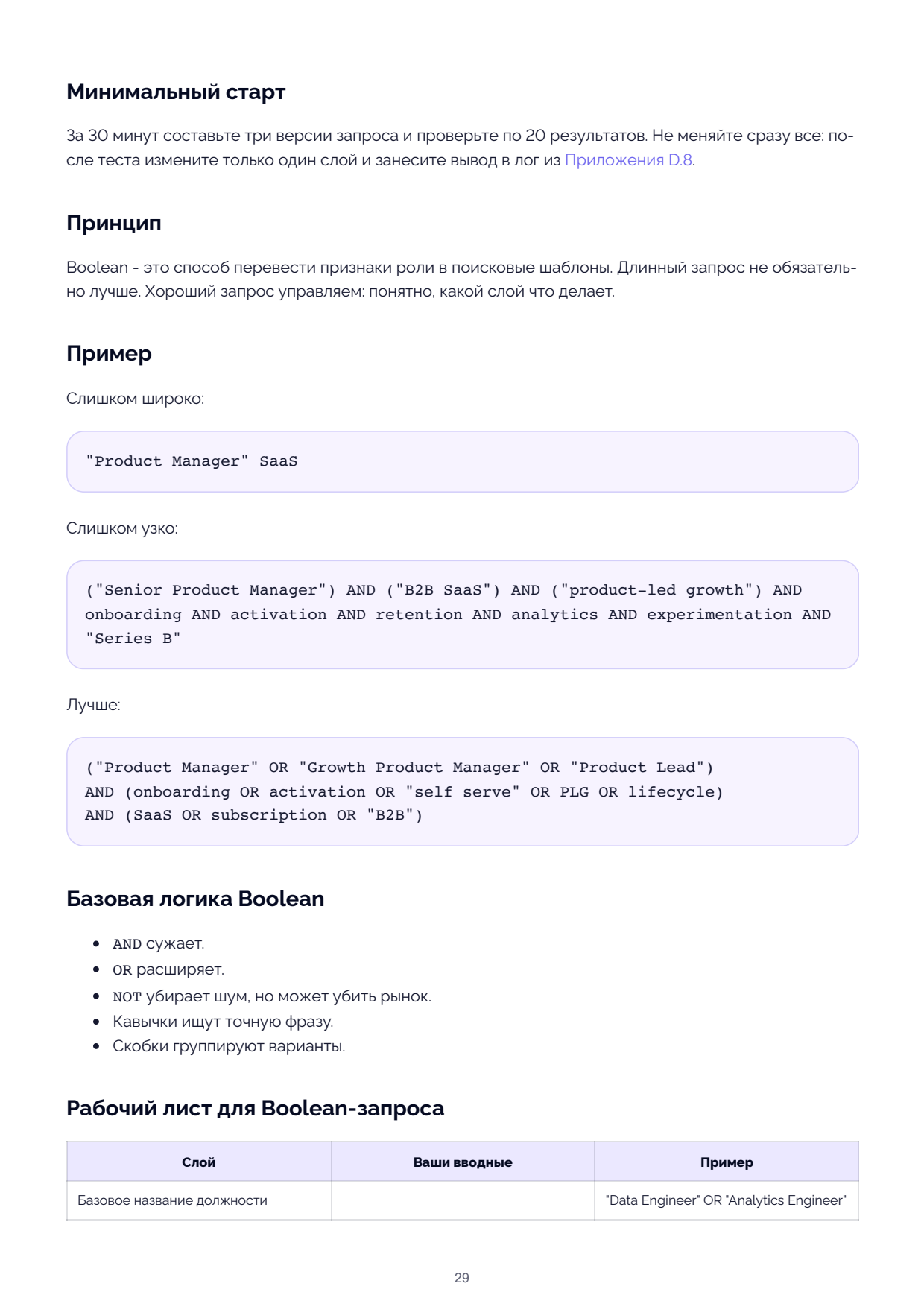
In 30 minutes, build three versions of the query and test 20 results each. Do not change

everything at once: after testing, change only one layer and log the conclusion from

Appendix D.8.

Principle

Boolean is a way to translate role traits into search patterns. A longer query is not necessarily

better. A good query is manageable: you can see what each layer does.

Example

Too broad:

"Product Manager" SaaS

Too narrow:

("Senior Product Manager") AND ("B2B SaaS") AND ("product-led growth") AND

onboarding AND activation AND retention AND analytics AND experimentation AND

"Series B"

Better:

("Product Manager" OR "Growth Product Manager" OR "Product Lead")

AND (onboarding OR activation OR "self serve" OR PLG OR lifecycle)

AND (SaaS OR subscription OR "B2B")

Basic Boolean Logic

AND narrows.

OR widens.

NOT removes noise but may kill the market.

Quotation marks search for an exact phrase.

Parentheses group variants.

Boolean Query Worksheet

Layer Your Inputs Example

Base job title "Data Engineer" OR "Analytics Engineer"

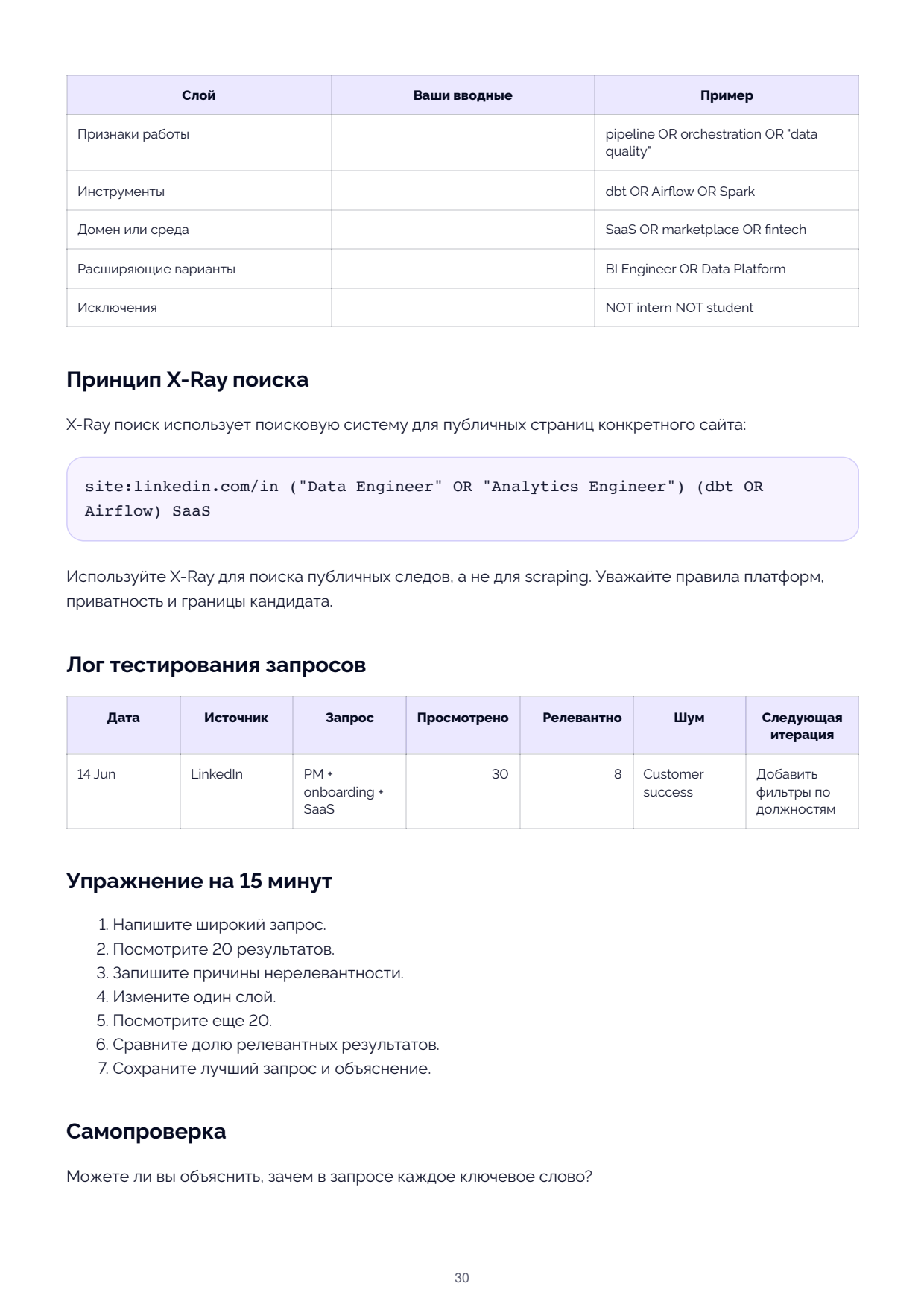
LayerYour InputsExample
Work traitspipeline OR orchestration OR "data quality"
Toolsdbt OR Airflow OR Spark
Domain or environmentSaaS OR marketplace OR fintech
Widening variantsBI Engineer OR Data Platform
ExclusionsNOT intern NOT student

X-Ray Search Principle

X-Ray search uses a search engine to find public pages on a specific site. It is useful when the platform's built-in search produces too much noise or applies restrictive filters.

X-Ray Example
site:linkedin.com/in ("Data Engineer" OR "Analytics Engineer") (dbt OR Airflow) SaaS

1. Write a broad query.

2. Review 20 results.

3. Record the reasons for irrelevance.

4. Change one layer.

5. Review another 20.

6. Compare the share of relevant results.

7. Save the best query and an explanation.

Self-Check

Can you explain why every keyword is in the query?

AI Tips for This Chapter

The full prompt for expanding Boolean queries is in Appendix G.4. Do not assume the longest

query is the best: first test broad, balanced, and narrow variants against the first 20 results.

Key Takeaways / Where to Go Next

Take away the iteration log: it matters more than a polished search string. If your queries are

starting to produce relevant profiles, move to Chapter 6 to integrate search, profile reading,

and outreach into your workflow.

Page 27 Page 28 Page 29 Page 30 Page 31